PLCnext Technology App Quality Guideline
We have high quality standards for the apps in the PLCnext Store. Learn more in this PLCnext Technology App Quality Guideline.
Foreword/Scope of application
This guideline in its respectively up-to-date version is an integral part of the developer terms for the PLCnext Store, where it is referred to as "Schedule 1 - Technology Requirements". It will be further developed and updated in the course of the further development and expansion of PLCnext Technology and PLCnext Store features and services.
In order to develop ready-made software applications (apps) for PLCnext Control and distribute them through the PLCnext Store to customers, it is mandatory to comply with the technology requirements as listed herein. Therefore check for the latest version of the guideline every time you upload a new or updated app.
Legal requirements
With regard to your obligations and liabilities in terms of security and compliance matters, please refer to section 8 "Security and Compliance" of the developer terms.
Professional presentation in the PLCnext Store
Make sure that your app is presented professionally in the PLCnext Store. This includes the following aspects:
App description
The app description should be comprehensive enough to give users a good impression of your app. Describe the areas of application, key features and user benefits. Highlight the unique selling point of your app and clearly differentiate it from other available apps. Use bulleted lists to keep the content clear and easy to read.
Icon
All common graphic formats are supported, for example .png, .jpg, or .svg.
- Make sure that the icon meets the required size of 180 x 180 px. The PLCnext Store applies rounded corners to the icon, with a maximum border radius of 18 px.
- Make sure that the message of the icon is clearly recognizable. Icons should be simple and easy to identify. Avoid using text or photographs. Complex company logos may lose clarity and recognizability when displayed as an app icon.
Versioning
Use the following version format: <MAJOR>.<MINOR>.<PATCH> <STATE/BUILD>
The MAJOR, MINOR and PATCH values must be numbers between 1 and 1000 (for example: 1.2.3 or 43.203.32).
- Increase the MAJOR version when making incompatible API change (for example: 3.0.0 is not compatible to 2.4.6).
- Increase the MINOR version when adding new functionalities in a backward-compatible manner.
- Increase the PATCH version for bug fixes.
The STATE/BUILD information is optional.
Please include information about the compatible PLCnext Engineer version in the app description.
Terminology specifications PLCnext Technology
PLCnext Technology is a registered trademark. Alternative spellings are not permitted. Similarly, the use of PLCnext [sic!] alone or coupled with other terms is not permitted.
Test
The developer is responsible for the entire test of the app. For every new released PLCnext Technology LTS firmware (once a year), the app has to be tested as soon as possible, latest 3 months after release of the firmware. It is recommended to list the tested firmware versions in the user documentation.
Third party licenses
- Create a license.txt file which contains all third party license texts.
Make sure that this license file is in the app download file you have created. - Publish the license.txt file in the Documents section of the app details page.
- Phoenix Contact recommends creating a separate chapter in your app documentation with the title "Third Party Licenses". For example, as an appendix.
Introduce the chapter as follows:
"This software makes use of third party packages with different licenses. The software packages and the licenses are listed in this chapter." - Enter all the licenses used here with a reference to where the licenses can be found.
Documentation
As a part of the app publication the developer has to provide documentation in English language for the app. English is the minimum requirement. Feel free to add documentation in other languages.
Instruction manual (technical details)
The developer has to provide a pdf documentation of the app. This documentation has to contain:
- The version of the app
- Change notes listing new features and known issues/limitations (if there are any) of the app
- It is recommended that the change notes are written chronologically descending (the latest version on top) and consecutively (all versions included in one document).
- The device the app is released for (device type/firmware version)
- A description of the function
- A startup instruction
- Contact information (e.g. email address) for support
You are also welcome to provide a quick start guide. The quick start guide should describe in a few precise steps how the minimum basic function of the app can be put into operation. Maximum 3 pages, preferably just one page.
Support
Technical and commercial support has to be ensured by the developer. A reaction during 1 workday is recommended. At latest, a reaction to the request needs to be given after 3 workdays.
Discontinue
To ensure our quality standards, please note all the information in this topic.
When you publish your app, you take on the responsibility of keeping your app up to date and maintaining it. Please note the information on the life cycles of the apps.
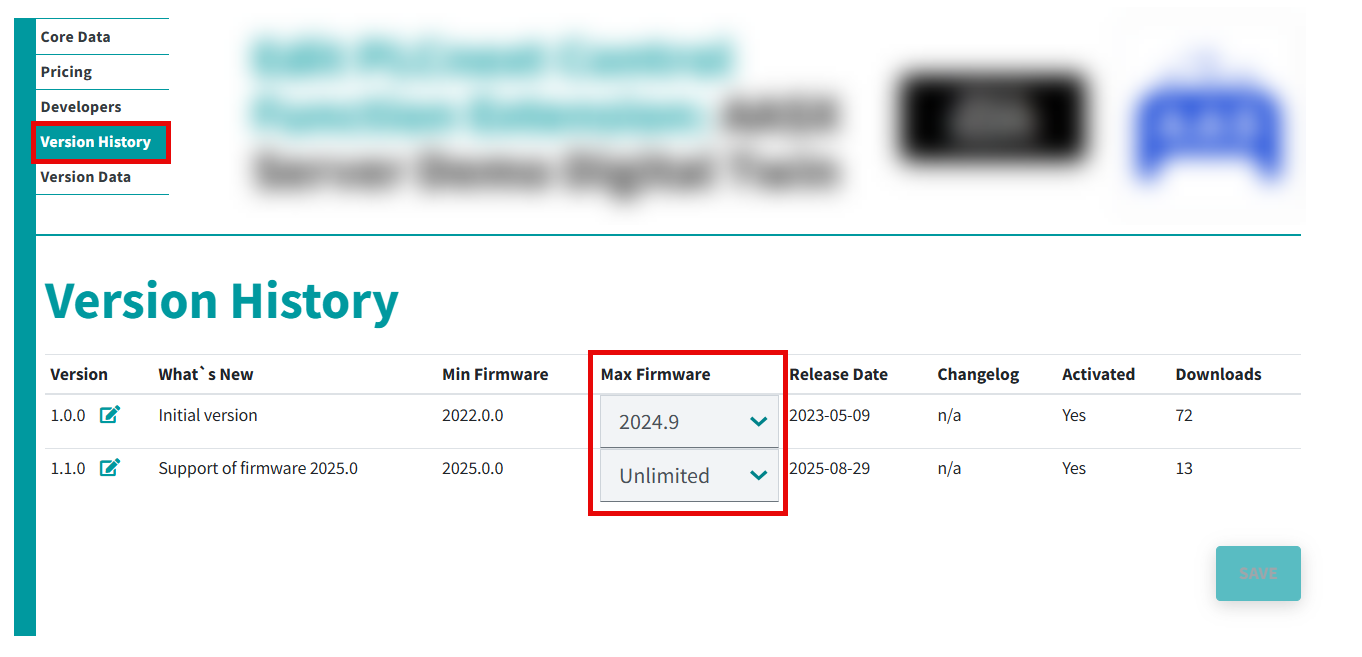
Check promptly whether your app is compatible with the latest firmware. If the app is not compatible, please add the corresponding max. firmware version for each app version in the PLCnext Store in the Version History under Max Firmware in your user profile. Proceed as follows:
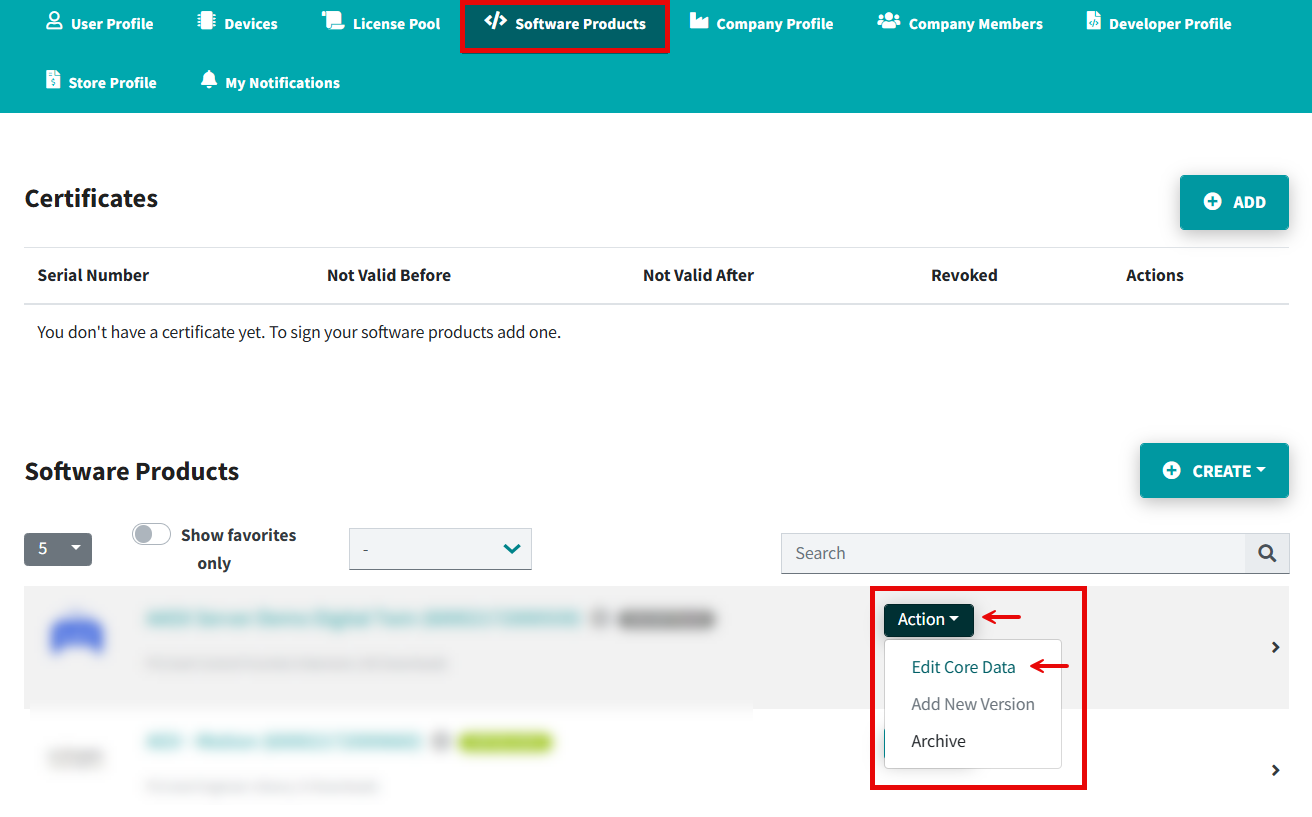
- Open the Software Products tab.
- Open the Core Data page (Action → Edit Core Data).
- Open the Version History tab and set the firmware version.
- Click the button.
If the decision has been made to cancel an app, set the status discontinued for your app (see life cycles), so that it is no longer available in the PLCnext Store. The legal aspects of cancelling the support of an app is defined in the developer terms.
Phoenix Contact reserves the right to initiate the discontinuation process if the app does not meet the above-mentioned quality standards.