


This post serves as a complement to this other post from 2025.
The files and libraries can be found in the same github repository from the old post.
The approach works for both the AXC F 2152 and the AXC F 3152. The difference, once again, resides on how to install the required libraries.
IMPORTANT: The approach has been tested and seen working for FW 2025.X
For the AXC F 2152:
The libraries grpcio and grpcio-reflection need to be cross compiled off device and be installed manually. These libraries (already cross compiled for Python 3.12) are available in the github repository.
Notice: Contrary to the old post, the use of reflection allows to skip entirely the use and compilation of the protobuf files. The following instructions allow you to create a container with Python 3.12 where you can run the scripts that make use of gRPC.
- Create a folder in /opt/plcnext to be used for the gRPC communication, this example will assign the name "grpc2152" to that folder. Within grpc2152, create the following folder structure:
grpc2152/
├──── whl_files312/
│      └─── (content of the whl_files312 folder from the given github repo)
│
└── gRPC_with_Reflection_26_0.py
- Connect to your PLC through an SSH session, log in as root user (su) and get the slim version of python 3.12: (at this point, internet connection is necessary to get the python image)
$ podman pull docker.io/library/python:3.12.13-slim
- Run the container and attach to it (linking the folder grpc2152 as a volume and a second volume (run) necessary for the connection to the grpc socket):
$ podman run -it -v /opt/plcnext/grpc2152/:/grpc2152 -v /run/:/run --restart=always --name grpctester python:3.12.13-slim /bin/bash
- Once attached to the container's console, navigate to the folder whl_files312 and install the necessary grpcio libraries.
$ cd /grpc2152/whl_files312/
$ pip install *.whl
-
Download and start the PLCnext Engineer project "TestingGRPC.pcwex" from the github repository.
-
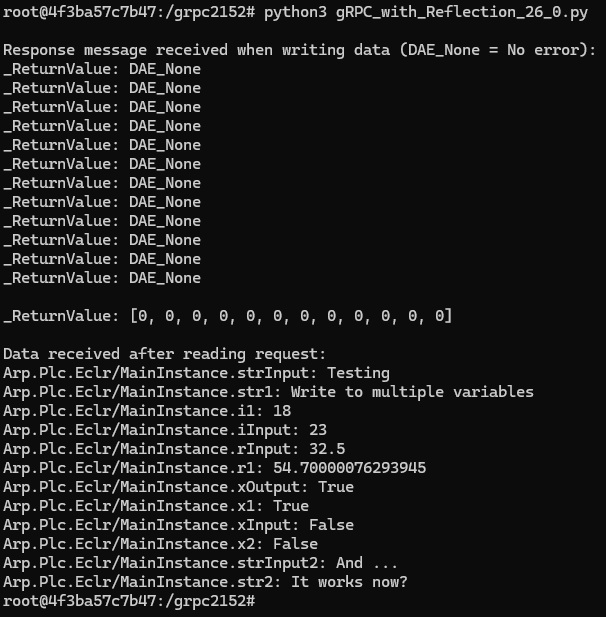
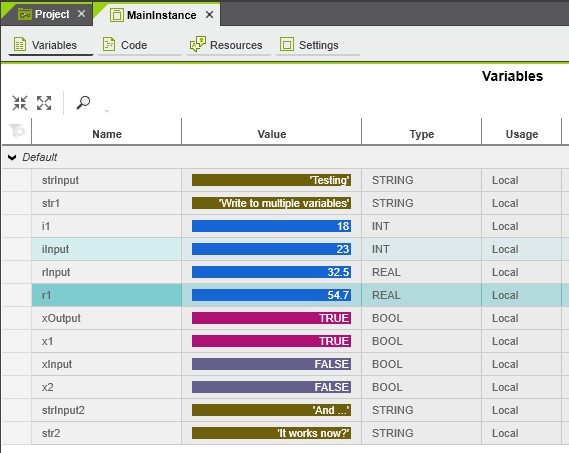
Test the grpc functionality from the console of the container by executing the script "gRPC_with_Reflection_26_0.py". In debug mode, the content of the variables should be populated with the text values from the script and also displayed on the console after being read from the PLCnext Engineer project.
For the AXC F 3152.
Follow the same procedure given for the 2152 instead of using the libraries from the repository, install the libraries directly from pypi.org
	$ pip install grpcio==1.76.0
	$ pip install grpcio-reflection==1.76.0

Leave a Reply
You must be logged in to post a comment.