Makers Blog

Use gRPC reflection to interface Python scripts with PLCnext Engineer Projects.

Pedro_Aguilar 02 April 2026 min. read
266 views 1 comments

This post serves as a complement to this other post from 2025.

The files and libraries can be found in the same github repository from the old post.

The approach works for both the AXC F 2152 and the AXC F 3152. The difference, once again, resides on how to install the required libraries.

IMPORTANT: The approach has been tested and seen working for FW 2025.X

For the AXC F 2152:

The libraries grpcio and grpcio-reflection need to be cross compiled off device and be installed manually. These libraries (already cross compiled for Python 3.12) are available in the github repository.

Notice: Contrary to the old post, the use of reflection allows to skip entirely the use and compilation of the protobuf files. The following instructions allow you to create a container with Python 3.12 where you can run the scripts that make use of gRPC.

  1. Create a folder in /opt/plcnext to be used for the gRPC communication, this example will assign the name "grpc2152" to that folder. Within grpc2152, create the following folder structure:
grpc2152/
├──── whl_files312/
│      └─── (content of the whl_files312 folder from the given github repo)
│
└── gRPC_with_Reflection_26_0.py
  1. Connect to your PLC through an SSH session, log in as root user (su) and get the slim version of python 3.12: (at this point, internet connection is necessary to get the python image)
$ podman pull docker.io/library/python:3.12.13-slim
  1. Run the container and attach to it (linking the folder grpc2152 as a volume and a second volume (run) necessary for the connection to the grpc socket):
$ podman run -it -v /opt/plcnext/grpc2152/:/grpc2152 -v /run/:/run --restart=always --name grpctester python:3.12.13-slim /bin/bash
  1. Once attached to the container's console, navigate to the folder whl_files312 and install the necessary grpcio libraries.
$ cd /grpc2152/whl_files312/
$ pip install *.whl
  1. Download and start the PLCnext Engineer project "TestingGRPC.pcwex" from the github repository.

  2. Test the grpc functionality from the console of the container by executing the script "gRPC_with_Reflection_26_0.py". In debug mode, the content of the variables should be populated with the text values from the script and also displayed on the console after being read from the PLCnext Engineer project.
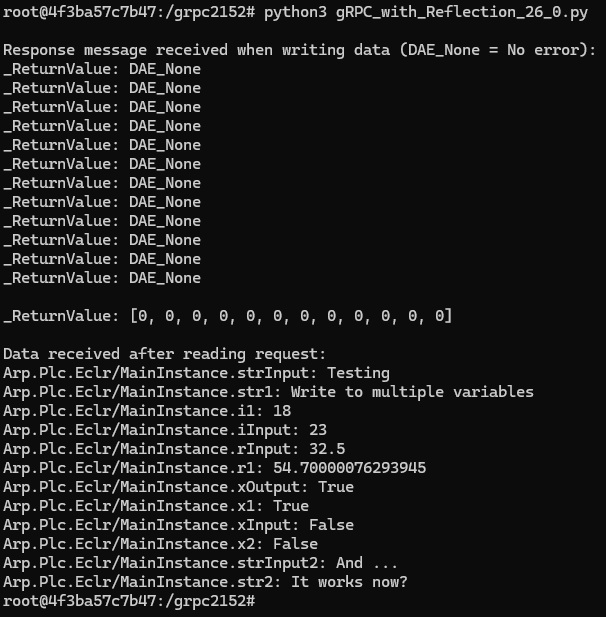
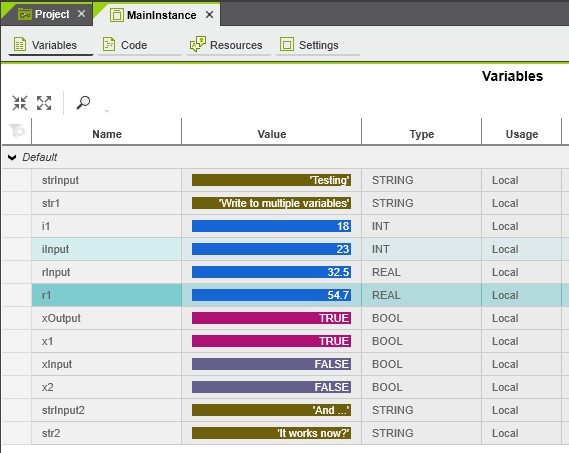
script_output.jpg
Debug_view.jpg

For the AXC F 3152.

Follow the same procedure given for the 2152 instead of using the libraries from the repository, install the libraries directly from pypi.org

	$ pip install grpcio==1.76.0
	$ pip install grpcio-reflection==1.76.0

Note:

The Makers Blog shows applications and user stories of community members that are not tested or reviewed by Phoenix Contact. Use them at your own risk.

Discussion

Please login/register to comment

Login/Register

Leave a Reply

fraunhoferiisbbirkmeir 12.05.2026

Hello Pedro, Thank you for this tutorial — it is exactly what I was looking for. I am trying to follow your tutorial on an AXC F 2152 running FW 2025.6, and I am running into a storage space problem during the pip install step inside the container. My setup: - AXC F 2152, FW 2025.6, Podman 5.4.2 - Rootless Podman (admin user — sudo is restricted on this device) - Working completely offline (no internet on the PLC) - Python 3.12 container (python:3.12.13-slim), loaded from a tarball via 'podman load' - Wheels from your whl_files312 archive (grpcio-1.76.0-cp312-cp312-linux_armv7l.whl, grpcio_reflection-1.76.0, protobuf-6.33.4, typing_extensions-4.15.0) The problem: the grpcio-1.76.0-cp312-cp312-linux_armv7l.whl from your repo is 184 MB compressed. When pip tries to install it inside the container, it fails with 'no space left on device'. Checking with 7-Zip, the uncompressed installed size of the wheel is approximately 478 MB. The writable partition (/dev/mmcblk0p6) is 488 MB total, with roughly 275 MB free after loading the Python image and removing the image tarball. So the install is about 200 MB short of fitting. I also tried the official PyPI grpcio-1.76.0-cp312-cp312-linux_armv7l.whl as a replacement (only ~6 MB), but that results in 'Illegal instruction (core dumped)' when importing grpc — presumably because it was compiled with ARMv7 extensions not supported by the Cortex-A9. My questions: 1. How did you handle the storage constraint on your own AXC F 2152 when installing the 184 MB wheel? Did you have significantly more free space on your device, or did you use a different approach? 2. Is the wheel intentionally that large (e.g. debug symbols, static linking)? Would a stripped build be feasible? 3. Would a microSD card inserted into the PLC's SD slot be a viable workaround — installing packages with 'pip install --target=/media/card/libs' and pointing PYTHONPATH there at runtime? Thank you in advance for any advice.

Login / Register to reply
Pedro_Aguilar 15.05.2026

Hello Fraunhoferiisbbirkmeir, Answering your questions: 1. I use an 8GB SD card. It is highly recommended if you want to install certain apps and avoid the issues you're facing right now. 2. The wheel is not that large on purpose. I am not that knowleadgeable with the cross-compilation approaches and although I did try for a while, I quickly gave up trying to get it to something much smaller due to how quick the complexity exploded. Here I will ask you to share your findings if you manage to cross-compile a much-smaller wheel or to find a fully-compatible version available online. 3. As stated in my first answer, the SD card solves directly the problem. You won't need to specify a target for PIP. The PLC overlays the memory structure over the SD-CARD itself. Once plugged and activated the memory is directly available and partitioning-wise, it becomes transparent for the user. Something additional: Part of the complexity and the reason for this post lies on getting a fully-compatible whl file. The processor of the 2152 quickly links compatibility to armv7 whls in the repositories but in my experience they often hit the illegal instruction problem you faced, which forces the user to cross-compile a compatible whl.

Pedro_Aguilar 15.05.2026

I forgot to mention that the approach works also without conteinerization (not the recommended approach). You can install PIP directly on the OS and try again. This will get rid of the overhead of the python container and image. The numbers are tight regarding size and space availability but you may get lucky.

Newsletter
Never miss a new article
Sign up for the newsletter
Never miss news about PLCnext Technology
Get interesting content via newsletter four times a year
Receive exclusive information before all other users